GuidesYour sales agent
Connect Telegram
Let customers message a Telegram bot of your own, answered by your sales agent.
4 min read · Updated 8 November 2026
A Telegram bot lets people message your business there, and your sales agent answers them just as it does in your store’s chat. It takes about a minute, and you need nothing beyond a Telegram account.
Make your bot
- In Telegram, open @BotFather and send
/newbot. - Pick a name, then a username that ends in bot.
- BotFather replies with a token. Copy it.
Connect it
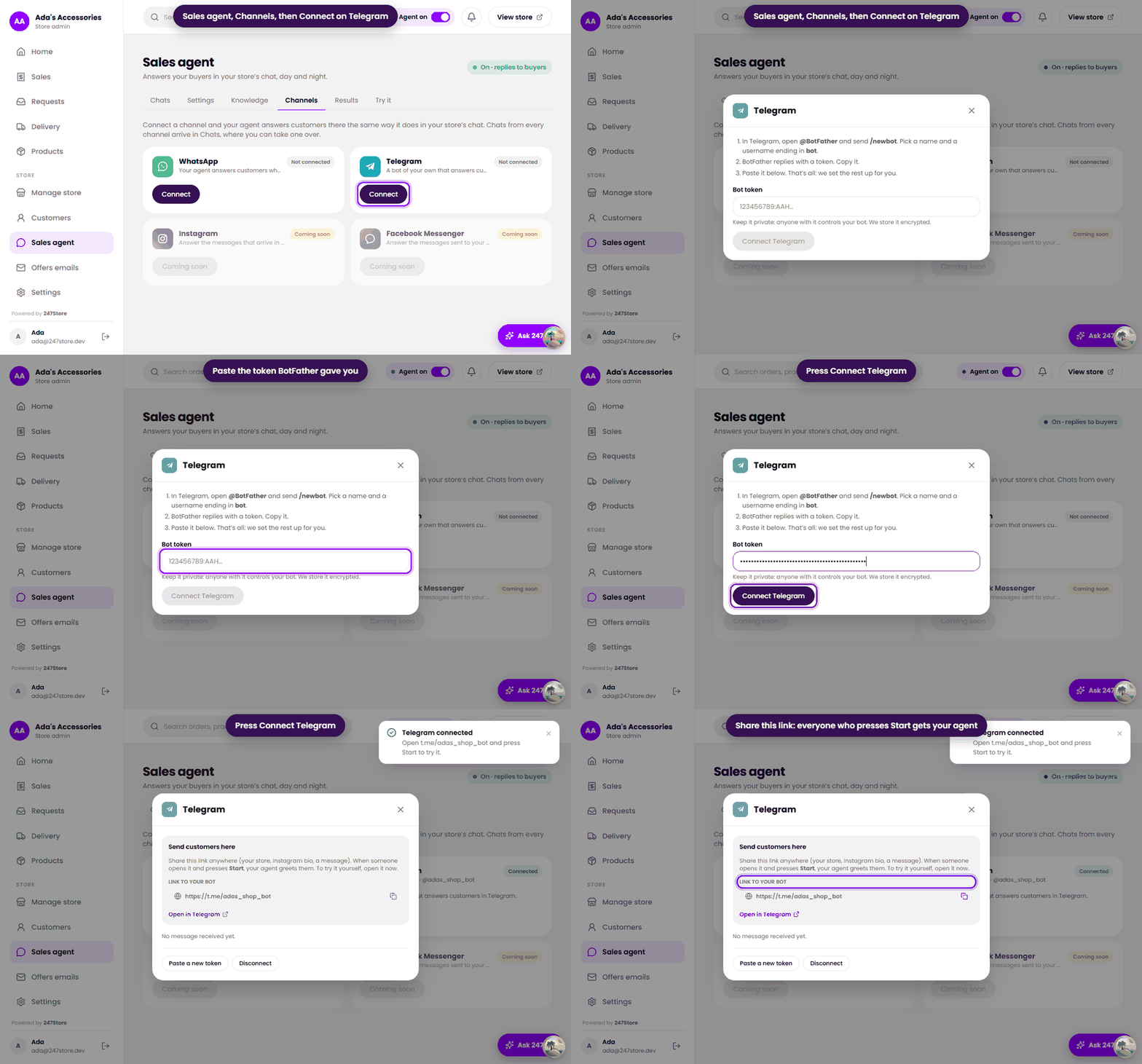
- In your dashboard, open Sales agent, then the Channels tab.
- Press Connect on the Telegram card.
- Paste the token into Bot token and press Connect Telegram.
- Copy the link to your bot that appears. Open it in Telegram and press Start to try it.
Share it and manage it
- Share the link anywhere: your store, your bio, a message. Everyone who presses Start gets your agent.
- Their chats arrive in Chats, where you can take one over. See Read chats and take over.
- Paste a new token if Telegram stops accepting the old one, and Disconnect to stop answering there.
- Only one-to-one chats are answered. Groups are ignored.
Read next
Still stuck? Write to support.